
A guild carries the same meaning as forming an in-game community or a team to tackle various content together; it refers to a shared community of destiny that requires cooperation and mutual help.
Creating a Guild

To create a guild, you need an " Emperium (item)" that can be obtained in-game.
If you have an "Emperium (item)", you can create a guild by typing "/guild (desired name)" in the chat window.
/guild (desired guild name)
Creating an Emblem
To advertise your guild or differentiate it from other guilds, you can express your guild through a distinctive emblem.

Dragonkind
- The emblem must be a 24*24 pixel BMP or GIF file. (However, please make sure the file size does not exceed 50kb.)
- Decide on the design to use as the emblem.
- Create an Emblem folder inside the folder where Ragnarok is installed, then save the completed emblem file there. (Default installation path: C\Gravity\RagnarokZero)
- Only the guild master can register or modify the emblem.
Guild Information
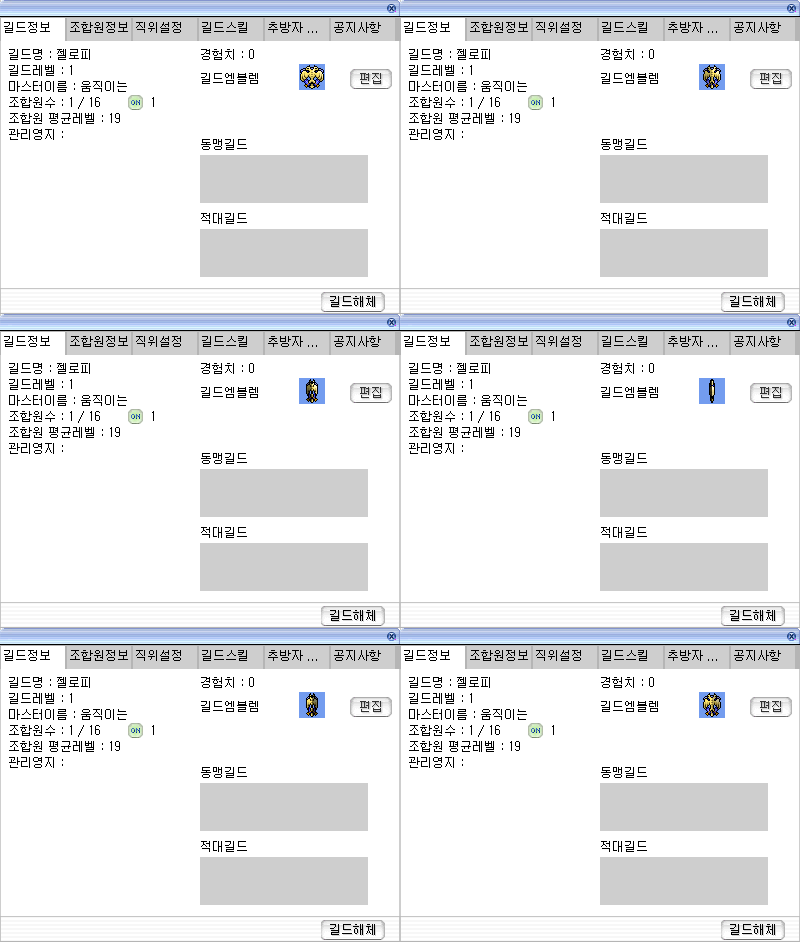
Guild Info | Member Info | Position Settings | Guild Skills | Expel Member ... | Notices
Guild Name:  Jellopy
Guild Level: 1
Guild Master: 움직이는
Member Count: 1 / 16 (ON) 1
Average Member Level: 19
Managed Territory:
Experience: 0
Guild Emblem [Edit]
Allied Guilds
Hostile Guilds
[Disband Guild]
After creating a guild, you can open the guild window to check detailed information and manage the guild. (Guild window: Alt + G)
Member Information
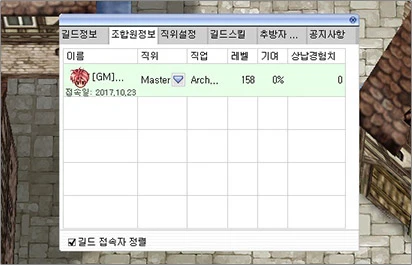
Guild Info | Member Info | Position Settings | Guild Skills | Expelled Members ... | Notice
| Name | Position | Class | Level | Contribution | Contributed EXP |
|---|---|---|---|---|---|
| [GM]... Last Login: 2017.10.23 | Master | Arch... | 158 | 0% | 0 |
☑ Sort by Online Guild Members
You can check information about guild members. If a guild member is logged in, their background will be displayed in 'green,' and their last login date will be shown at the bottom.
※ Only the guild master can change the position of guild members.
Position Settings
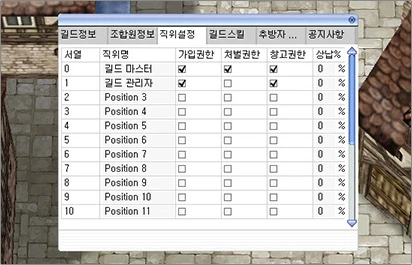
Guild Info | Member Info | Position Settings | Guild Skills | Expelled Members ... | Notice
| Rank | Position Name | Invite Permission | Punishment Permission | Storage Permission | Tax % |
|---|---|---|---|---|---|
| 0 | Guild Master | ☑ | ☑ | ☑ | 0 % |
| 1 | Guild Manager | ☑ | ☑ | ☑ | 0 % |
| 2 | Position 3 | ☐ | ☐ | ☐ | 0 % |
| 3 | Position 4 | ☐ | ☐ | ☐ | 0 % |
| 4 | Position 5 | ☐ | ☐ | ☐ | 0 % |
| 5 | Position 7 | ☐ | ☐ | ☐ | 0 % |
| 6 | Position 8 | ☐ | ☐ | ☐ | 0 % |
| 7 | Position 9 | ☐ | ☐ | ☐ | 0 % |
| 8 | Position 9 | ☐ | ☐ | ☐ | 0 % |
| 9 | Position 10 | ☐ | ☐ | ☐ | 0 % |
| 10 | Position 11 | ☐ | ☐ | ☐ | 0 % |
This is a space where you can set the position of each guild member. Through contribution, a portion of the experience gained from hunting monsters can be donated as guild experience, and the guild contribution rate can be set up to a maximum of 50%.
※ Only the guild master can change guild members' positions, position authority, and contribution settings.
Guild Skills
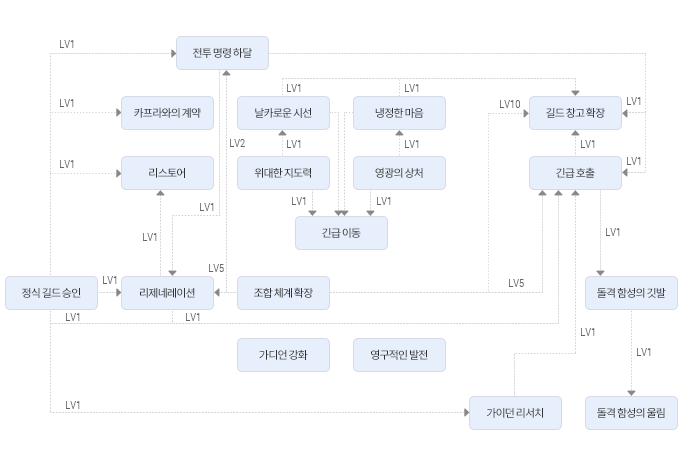
 Battle Orders
 Kafra Contract
 Restoration
 Sharp Gaze
 Cold Heart
 Great Leadership
 Glorious Wounds
 Emergency Move
 Guild Storage Expansion
 Urgent Call
 Official Guild Approval
 Regeneration
 Guild Extension
 Charge Shout Flag
 Strengthen Guardians
 Permanent Development
 Guardian Research
 Charge Shout Beating
LV1, LV2, LV5, LV10 (level requirements shown on each arrow)
Guild Management
Official Guild Approval (Guild Approval) This skill formally recognizes the guild, and without investing in this skill, you cannot attack the Emperium. It is a basic function and the starting point of all guild skill trees.
Kafra Contract (Kapra Contact) Allows you to hire a Kafra within the guild. If you pay the steward and make a request, a Kafra will be dispatched from the Kafra Head Office in Al De Baran and stationed within the guild building.
Permanent Development (Emsolute Develop) As development level increases, there is a random chance for the development level to rise further. However, the guild's total development level is not affected.
Guild Storage Expansion Allows use of the guild storage. Through Guild Storage Expansion, you can increase the number of storage slots.
Guild Combat
Guardian Research (Guardian Research) Allows you to research and deploy Guardians. As before, there are no changes; different Guardians are deployed depending on the location of the Hideout and the region.
 Guard Up: Strengthen Guardians (Build up the Guardian) Has the effect of strengthening already-created Guardians. Each time you raise the skill by 1 level, the Guardian's attack power and attack speed are strengthened. This effect never disappears. If the ownership of the Hideout changes, it will change according to the skill of the new owning guild.
Guild Extension (Extension Guild) Increases the number of members who can join the guild. Starting from a base of 16, each skill level increase adds 4 more members, expanding to a maximum of 56 members at skill level 10. It is a basic function and the starting point of all guild skill trees.
Battle Orders (Battle Orders) This skill can only be used in siege mode. A skill exclusive to the guild master that increases the STR, INT, and DEX of all guild members within sight by 5. It lasts for 1 minute, after which the effect disappears and returns to normal.
Regeneration (Regeneration) This skill can only be used in siege mode. A skill used by the guild master that increases the HP recovery speed of all guild members within sight.
① Skill Level: HP recovery speed x2.
② Skill Level: HP/SP recovery speed x2.
③ Skill Level: HP/SP recovery speed x3.
Restoration (Restore) This skill can only be used in siege mode. Recovers HP/SP of all guild members within sight by 90% of their maximum HP/SP.
Urgent Call (Emergency Call) This skill can only be used in siege mode. Forcibly gathers all guild members currently in the guild to the guild master's side.
Charge Shout Flag This skill can only be used in siege mode. Usable only by the guild master; installs a flag so that guild members can instantly gather.
Charge Shout Beating This skill can only be used in siege mode. Usable by any guild member; instantly moves the user to the location where the Charge Shout Flag was installed.
Emergency Move This skill can only be used in siege mode. Usable only by the guild master; greatly increases the movement speed of guild members near the guild master.
Guild Hunting
Great Leadership (Great Leadership) Within a 5x5 cell range centered on the guild master, all guild members receive a +1 weight to STR per level of this guild skill. This is a passive skill that can also be used while hunting. (The guild master is excluded from the skill's effect.)
Glorious Wounds (Wounds of Glory) Within a 5x5 cell range centered on the guild master, all guild members receive a +1 weight to VIT per level of this guild skill. This is a passive skill that can also be used while hunting. (The guild master is excluded from the skill's effect.)
Cold Heart (Soul of Cold) Within a 5x5 cell range centered on the guild master, all guild members receive a +1 weight to AGI per level of this guild skill. This is a passive skill that can also be used while hunting. (The guild master is excluded from the skill's effect.)
Sharp Gaze (Sharp  Hawk Eyes) Within a 5x5 cell range centered on the guild master, all guild members receive a +1 weight to DEX per level of this guild skill. This is a passive skill that can also be used while hunting.
Expelled Members List
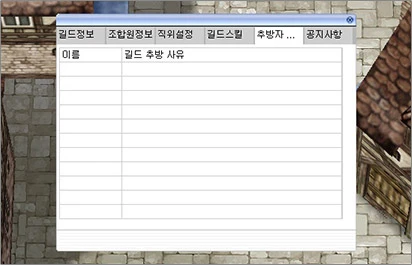
Guild Info | Member Info | Position Settings | Guild Skills | Expelled Members ... Notice
Name | Reason for Guild Expulsion
This is a space where members expelled from the guild are recorded.
Notices
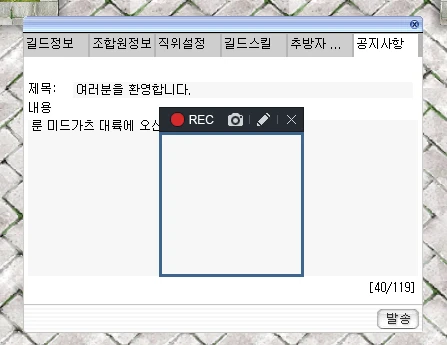
Guild Info | Member Info | Position Settings | Guild Skills | Expelled Members ... Notice
Title: Welcome to all of you.
Content
Welcome to the Rune-Midgarts Continent...
[40/119]
Send
This is a space for recording notices that need to be communicated to guild members. When a notice is registered, the notice content will appear in yellow in the chat window when logging into the game or moving between maps.
※ The content of the website information may change somewhat depending on game updates.